Website    myTAFE SA     YuJa Video     Help    
TAFE SA
TAFE SA Learn Homepage
Log in
  1. Home
  2. Learn
  3. Student Help

Student Help

Back

Quiz with Essay Questions Help

  1. Select the Attempt quiz now button to start the quiz.
  2. When you have finished select Finish attempt... (located in the top left corner of the page or below the last question in the quiz).
  3. Select the Submit all and finish button on the Summary page to submit your answers for feedback and an assessment outcome.

NOTE: If you return to complete your second attempt and see "Not yet graded" as in the image below – this message indicates that your first attempt is still needing to be marked by your Lecturer.

Do not select "Re-attempt quiz" to commence your second attempt until the Lecturer has assessed your first attempt.

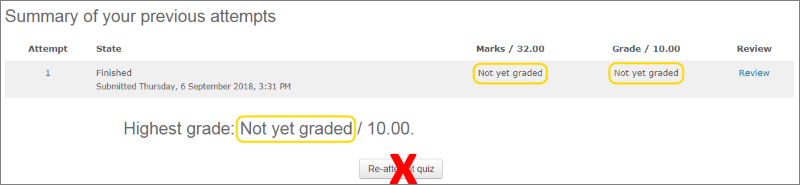
Screenshot of assessment review summary showing grade = not yet graded with a red cross through the words Re-attempt quiz

» Student Help

◄ TAFE SA Learn Terms of Use

Blocks

Skip Study Support

Study Support

Studiosity Logo 

Accessibility

Panorama Accessibility

Skip Upcoming events

Upcoming events

There are no upcoming events
Go to calendar...
We acknowledge the traditional owners of the lands on which TAFE SA stands.

Help |  Copyright | Privacy | Disclaimer | Terms of Use | CRICOS No: 00092B | RTO Code: 41026

Government of South Australia   

  • Study areas
  • Arts & Design
  • Building & Construction
  • Business & Marketing
  • Community Services
  • Education & Languages
  • Mining, Engineering & Transport
  • Government, Property & Legal
  • Hair & Beauty
  • Health & Lifestyle
  • Hospitality & Tourism
  • Information Technology
  • Primary Industries & Science
  • Staff Training
  • Resources
  • Learn Moodle
  •  
  • Support
  • Student Support
  • Educator Support
  •  
  • Information & Services
  • Policies & Responsibilities
  • Student Services
Built with Open LMS, a Moodle-based product.
Copyright © 2026 Open LMS, All Rights Reserved.

Get the mobile app